

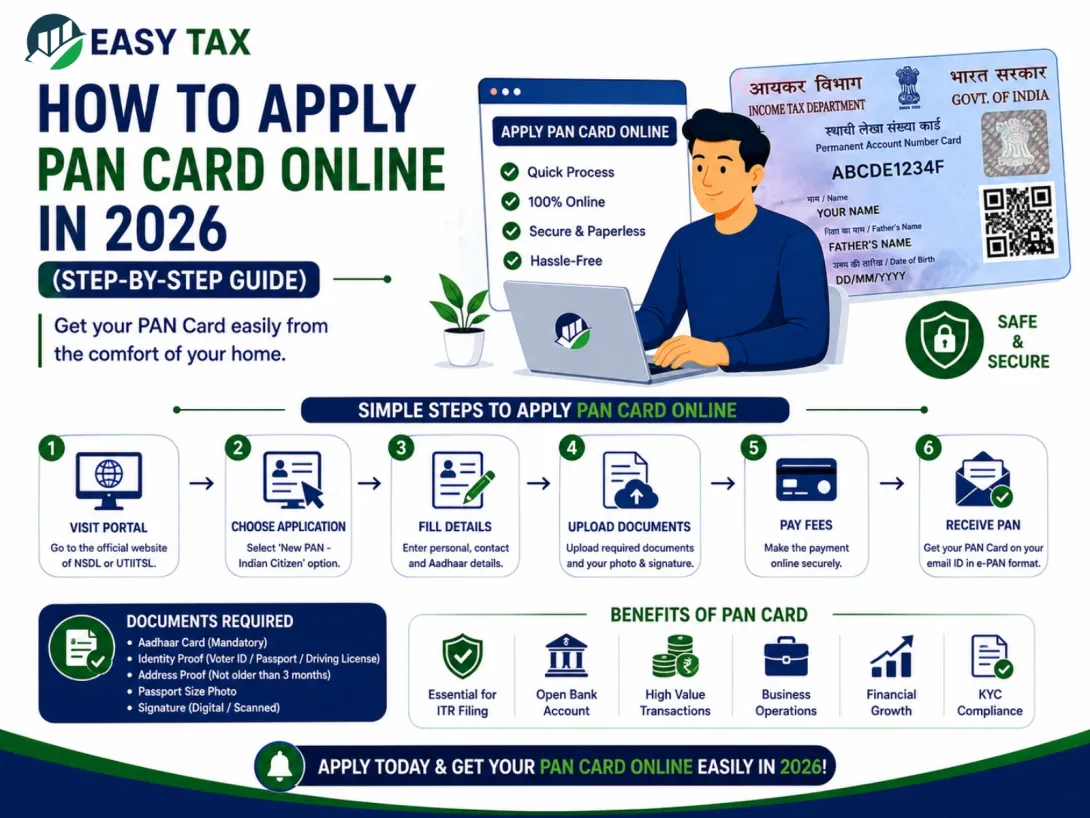
A Permanent Account Number (PAN) card is one of the most important financial documents in India. Whether you want to open a bank account, file income tax returns, invest in mutual funds, or apply for loans, a PAN card is mandatory in many situations.
The good news is that the process of how to apply PAN card online has become simple and quick in 2026. You can complete the application from your home using your mobile phone or computer.
In this guide, we will explain the complete PAN application process, required documents, fees, instant PAN card through Aadhaar process, PAN card correction online steps, and other important PAN-related services.
What is a PAN Card?
PAN stands for Permanent Account Number. It is a 10-digit alphanumeric number issued by the Income Tax Department of India.
Example:
ABCDE1234F
A PAN card helps the government track taxable financial transactions and is required for various banking and tax-related activities.
Benefits of Having a PAN Card
A PAN card is useful for:
- Filing Income Tax Returns (ITR)
- Opening bank accounts
- Applying for loans and credit cards
- Investing in mutual funds and stocks
- Buying or selling property
- Receiving taxable income
- Starting a business
Who Can Apply for PAN Card?
The following individuals and entities can apply:
- Indian citizens
- Students
- Salaried employees
- Freelancers
- Business owners
- NRIs
- Partnership firms
- Companies
Even students can apply for a PAN card for banking and investment purposes.
Documents Required to Apply PAN Card Online

Before starting the online application, keep the following documents ready.
Identity Proof
- Aadhaar Card
- Voter ID
- Passport
- Driving License
Address Proof
- Aadhaar Card
- Electricity Bill
- Bank Statement
- Passport
Date of Birth Proof
- Birth Certificate
- Aadhaar Card
- Passport
- Class 10 Marksheet
Passport Size Photograph
Required for physical PAN applications.
How to Apply PAN Card Online
Follow these simple steps to apply for PAN card online in 2026.
Step 1: Visit the Official PAN Portal
Open the official PAN application website and select the option for a new PAN application.
You will usually need to choose:
- New PAN for Indian Citizen (Form 49A)
- New PAN for Foreign Citizen (Form 49AA)
Step 2: Fill Basic Details
Enter:
- Full name
- Date of birth
- Mobile number
- Email ID
After submitting the basic details, you will receive a token number for future reference.
Step 3: Select Aadhaar e-KYC Option
If your Aadhaar is linked with your mobile number, choose Aadhaar e-KYC for faster verification.
This method helps complete the application quickly without uploading many documents.
Step 4: Enter Personal Information
Fill in:
- Father’s name
- Address details
- Aadhaar number
- Income source
Make sure all details match your Aadhaar records.
Step 5: Upload Documents
Upload scanned copies of:
- Identity proof
- Address proof
- Date of birth proof
If using Aadhaar e-KYC, document upload requirements may be reduced.
Step 6: Make Online Payment
Pay the PAN application fee using:
- UPI
- Debit card
- Credit card
- Net banking
Step 7: Complete OTP Verification
You will receive an OTP on your Aadhaar-linked mobile number.
Enter the OTP to verify your identity.
Step 8: Download Acknowledgement
After successful submission, download the acknowledgement receipt.
This acknowledgement number can later be used to track PAN application status.
Instant PAN Card Through Aadhaar
The Income Tax Department also offers an instant PAN card through Aadhaar facility.
This option is useful for users who:
- do not already have a PAN card,
- have Aadhaar linked with mobile number.
The process is fully paperless and usually takes only a few minutes.
Steps for Instant PAN:
- Visit the Instant e-PAN portal.
- Enter Aadhaar number.
- Verify OTP.
- Submit request.
- Receive e-PAN digitally.
e PAN Card Download Password
Many users get confused while opening their downloaded e-PAN PDF file.
The e PAN card download password is usually:
Your date of birth in DDMMYYYY format
Example:
If your DOB is:
15 August 2000
Password will be:
15082000
PAN Card Active Status Check
You can also perform a PAN card active status check online.
This helps verify whether:
- PAN is active,
- deactivated,
- or linked correctly with Aadhaar.
Checking PAN status regularly is important before filing ITR or doing financial transactions.
PAN Aadhaar Link Status

The government has made PAN-Aadhaar linking mandatory for most PAN holders.
You can check your PAN Aadhaar link status online by:
- entering PAN number,
- Aadhaar number,
- and verifying OTP.
If PAN and Aadhaar are not linked, your PAN may become inactive.
PAN Card Correction Online

If there are mistakes in your PAN card, you can use the PAN card correction online facility.
You can correct:
- name spelling,
- date of birth,
- father’s name,
- address,
- photograph,
- signature.
Common Reasons for PAN Correction
- Name mismatch with Aadhaar
- Wrong DOB
- Typing mistakes
- Marriage-related surname changes
PAN Card Mobile Number Update
If your old mobile number is no longer active, you should complete the PAN card mobile number update process.
This is important because:
- OTP verification requires active mobile number,
- PAN services often use Aadhaar-linked number.
You may need to update:
- Aadhaar mobile number,
- PAN-linked contact details.
PAN Card Cancellation
In some situations, users may need PAN card cancellation.
This usually happens when:
- a person has multiple PAN cards,
- duplicate PAN cards are issued accidentally.
Holding multiple PAN cards is not allowed under Income Tax rules.
In such cases, surrender or cancellation request should be submitted online.
Common Mistakes to Avoid While Applying PAN Card
Avoid these mistakes during PAN application:
- Entering wrong Aadhaar number
- Using mismatched name spelling
- Uploading blurred documents
- Incorrect date of birth
- Wrong mobile number
- Signature mismatch
These mistakes may delay PAN approval.
How Long Does PAN Card Delivery Take?
Usually:
- Instant e-PAN takes a few minutes or hours.
- Physical PAN card delivery may take 7–15 working days.
Delivery time may vary depending on location and document verification.
Frequently Asked Questions
Can students apply for PAN card?
Yes, students can apply for PAN cards online.
Is Aadhaar mandatory for PAN application?
Aadhaar is commonly required for e-KYC verification.
Can I download PAN card online?
Yes, you can download e-PAN online after approval.
Can I apply for PAN card using mobile?
Yes, the complete process can be done through a smartphone.
Final Words
Now that you understand how to apply PAN card online, the process becomes much easier and faster. Whether you want a new PAN card, instant PAN card through Aadhaar, PAN card correction online, or PAN Aadhaar link status check, most services are now available online.
Always make sure your details are correct and keep your Aadhaar-linked mobile number active for smooth verification.
If you face any issues with PAN application, correction, cancellation, or status tracking, you can also take professional help for faster processing.


